

RAIGIS
@RAIGIS555
Buyer
mantapp recomend
Browse the entire Roblox avatar catalog with categories, search, price and creator filters, 6 sort modes (Bestselling, Most Favorited and more), or paste an item link.
Try any item on your avatar before buying. Hover a card to see your avatar wearing it, with a 3D viewport you can rotate and zoom.
Buy single items or a whole cart at once (bulk purchase, up to 20 items per checkout). Items a player already owns are shown as Owned automatically.
Detail pages show description, creator, type, Roblox favorite count, linked items and recommendations. Players can save favorite items and see their history.
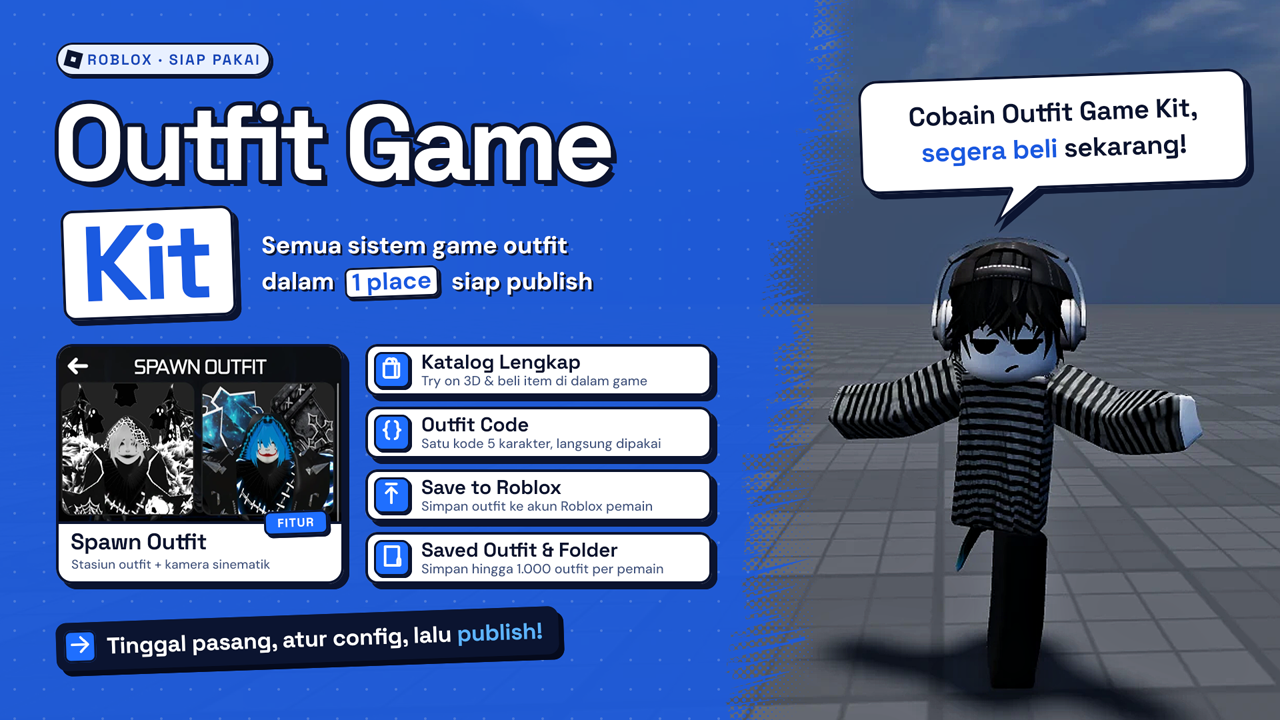
Save up to 1,000 outfits per player, group them into folders, then search, sort, rename and update them. Unnamed outfits automatically get a theme-based name.
Save an outfit from the game straight to a Roblox account, as a new outfit or as the main avatar. Owned and unowned items are listed separately.
Create a 5-character code for any outfit you pick. Players just enter the code to wear the whole look at once, with view and "Worn by" counters.
An in-game outfit store: showcase your outfits with total cost, a Buy Outfit button, more outfits by the same creator and recommendations.
Type any Roblox username to view and try the outfits saved on that account. It runs through the Sippiw Labs server, so you don't need your own proxy.
An outfit spawn station with a cinematic camera and drag-to-rotate. Each room belongs to the first player inside, while others can still view and try on the displayed outfit.
Adjust skin color, R6/R15 rig, body scale, layered clothing & makeup order, plus accessory effects: transparency, reflectance, color and position.
Animations and Emotes menus to try and buy animation packs or emotes. There's also a music player in Settings that shows song titles automatically.
Most Purchase, Most Spent and Most Donated leaderboards (monthly and all time), a Live Purchase feed, leaderstats and the Top 1 avatar displayed on the map with an emote.
The donation menu reads your game's Developer Products automatically. Click another player to see their profile and current outfit, Buy all, or Gift Robux via Roblox's official feature.
Every item purchase is posted to your Discord channel via webhook, with the item image. Includes per-player purchase history and a celebration effect on purchase.
A cinematic 3D loading screen that showcases outfits one after another, with tips, music, logo and camera effects. All text, colors and timing are configurable.
Outfit Game Kit V1 is a complete kit for building an outfit / avatar shop game on Roblox. Players can browse the entire Roblox catalog, try items on their avatar, buy without leaving the game, then save and share their outfits. Just install, adjust the config and publish.
Every item players buy inside your game also earns the game owner a sales commission from Roblox, under Roblox's commission program.
What you get:
Setup:
Optional: add a Discord webhook and swap the music, logo and loading screen text in the config.
Every setting lives in config modules (commented in Indonesian), so you never have to edit scripts. Examples: colors, music, text, camera, leaderboards and outfit limits.
Player comfort features: FOV and motion blur settings, show/hide players, names and chat, a hide-menu button, UI sounds, background blur while panels are open, notifications, and reset to Roblox avatar.
License terms:
Buyer reviews
mantapp recomend
Replies may be delayed
Chat with an admin
Log in to your account to start chatting. Your conversation becomes a private ticket in the Sippiw Labs Discord.
Log in to chat No account yet? Sign upLoading…
Could not load. Check your connection and try again.
Enter to send · Shift+Enter for a new line